
TSE Scanner Client developer guide
@tse/scanner-client lets a web page scan documents through the TSE Scanner Agent, the Windows tray app
running on the employee's PC. Your page talks to the agent on http://127.0.0.1:47391; your backend only
receives the files your page uploads.
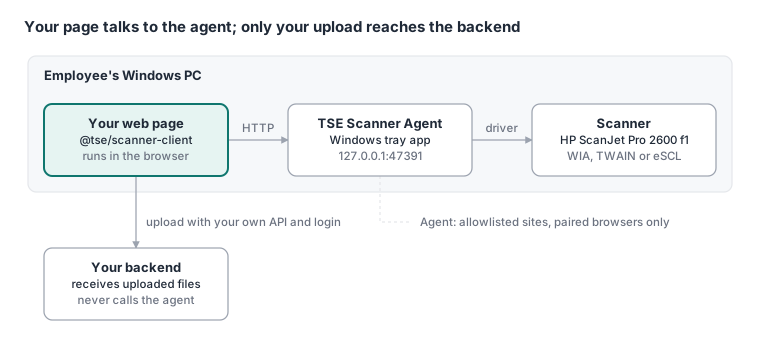
The agent accepts only origins on its allowlist and browsers the employee paired by clicking Allow. Your backend never calls the agent.
Setup
Five steps, about 20 minutes plus IT's install time. No token is needed: the package registry allows anonymous pulls.
Point npm at the registry. Add one line to your project's
.npmrc:@tse:registry=https://gitlab.com/api/v4/projects/87828624/packages/npm/Install the package, pinned to an exact version:
npm install --save-exact @tse/scanner-client@1.1.2Add the agent URL to your runtime config (
public/config.js), so a site can change the port without a rebuild:window.SCANNER_AGENT_URL = "http://127.0.0.1:47391";Type it in
src/types/global.d.ts:SCANNER_AGENT_URL?: stringinsideinterface Window.Send IT the exact origin of every environment that will scan: scheme + host + port, no path (for example
https://staging.portal.example.com). IT installs the agent with that list. An origin missing from it fails with403 origin_not_allowed, or with "Failed to fetch" when the browser blocks the preflight.Serve the page over https. Chrome and Edge only let a secure page call
127.0.0.1.http://localhostworks for development. An http test site needschrome://flags/#unsafely-treat-insecure-origin-as-secure(Edge:edge://flags) with its origin on each tester's browser.
The package is plain ES modules: it loads in any bundler and in Node (useful for unit tests); a browser
without a bundler needs an import map for @tse/scanner-client. Types resolve on TypeScript 5 and on TypeScript 4.x with
"moduleResolution": "node". React 18 or later is an optional peer dependency, needed only for
@tse/scanner-client/react.
Create the client once per app, not per component:
import { ScannerAgentClient } from "@tse/scanner-client";

let client: ScannerAgentClient | null = null;

export const getScannerClient = () => {
  client ??= new ScannerAgentClient({ baseUrl: window.SCANNER_AGENT_URL ?? "http://127.0.0.1:47391" });
  return client;
};
React quick start
useScanSession runs the whole flow: connect, pair, one scan per side, rotate, cancel. ScanReviewPanel
is a ready-made UI on top of it. This example scans an ID card front and back and uploads one stacked JPEG.
import { composeVertical, type ScanRequest } from "@tse/scanner-client";
import { ScanReviewPanel, useScanSession, type SideSpec } from "@tse/scanner-client/react";

import { getScannerClient } from "./scannerClient";
import { scanLabels } from "./scanLabels";

// Module-level constants: the hook re-creates its callbacks when these change identity.
const SIDES: SideSpec[] = [
  { key: "front", label: "Front" },
  { key: "back", label: "Back" },
];
const SCAN_REQUEST: ScanRequest = { source: "flatbed", dpi: 300, colorMode: "color", format: "jpeg", autoCrop: true };

export const IdCardScan = ({ onUploaded, onCancel }: { onUploaded: () => void; onCancel: () => void }) => {
  const session = useScanSession({ client: getScannerClient(), sides: SIDES, scanRequest: SCAN_REQUEST });

  const handleConfirm = async (images: Blob[]) => {
    const composite = await composeVertical(images, { type: "image/jpeg", quality: 0.92 });
    const form = new FormData();
    form.append("File", new File([composite], "id-card.jpg", { type: "image/jpeg" }));
    await uploadDocument(form); // your normal authenticated API call
    onUploaded();
  };

  return (
    <ScanReviewPanel session={session} sides={SIDES} labels={scanLabels} onConfirm={handleConfirm} onCancel={onCancel} className="id-card-scan" />
  );
};
What happens on screen, in order:
- Checking: the hook calls
health()on mount (turn off withautoConnect: false). - Agent unavailable: the panel lists
labels.unavailableStepsand a Retry button. - Unpaired: a Pair button. On click the agent opens a Windows dialog with a six-digit code; the panel
shows the same code through
labels.pairingHint(code). The token is kept inlocalStorageper origin, so this happens once per browser. - Ready: one card per side with Scan, Rescan and Rotate. Each scan uses
maxPages: 1and yourscanRequest. - Confirm: enabled when every side is scanned.
onConfirmgets the rotated images in side order; the panel disables itself until your promise settles.
labels is where your translations go. Every field is required:
import type { ScanReviewLabels } from "@tse/scanner-client/react";

export const scanLabels: ScanReviewLabels = {
  scan: "Scan", rescan: "Scan again", rotate: "Rotate", cancelScan: "Stop scanning",
  scanning: "Scanning…", waiting: "Not scanned", done: "Scanned",
  confirm: "Save", cancel: "Cancel", retry: "Retry", pair: "Connect this browser to the scanner",
  pairingHint: (code) => `Check that the dialog on this PC shows ${code}, then click Allow.`,
  unavailableTitle: "The scanner agent is not running on this PC",
  unavailableSteps: ["Open TSE Scanner Agent from the Start menu.", "Then click Retry."],
  connectedTo: (deviceName, version) => `Connected to ${deviceName} (agent ${version})`,
  errorMessage: (error) => messageFor(error.code), // see Errors
};
The panel ships with no CSS. Style its BEM classes (tse-scan, tse-scan__side, tse-scan__btn--primary,
…) under your own className. To build your own UI instead, use the hook alone: it returns agent,
sides, allDone, scan(key), rotate(key, 90), collect() and the rest listed in the API reference.
Plain TypeScript quick start
Without React (Angular, Vue, plain JS), call the client directly. scan() starts the job, polls it and
downloads every page as a Blob.
import { ScannerAgentClient, generatePairingCode } from "@tse/scanner-client";

const client = new ScannerAgentClient({ baseUrl: window.SCANNER_AGENT_URL ?? "http://127.0.0.1:47391" });

export async function scanDocument(showCode: (code: string) => void, signal?: AbortSignal): Promise<Blob[]> {
  if (!(await client.isPaired())) {
    const code = generatePairingCode();
    showCode(code); // "Check the code 123-456 in the dialog and click Allow"
    await client.pair(code); // resolves after Allow; rejects with pairing_denied on Deny
  }
  const result = await client.scan(
    { source: "flatbed", dpi: 300, colorMode: "color", format: "jpeg", autoCrop: true },
    { signal, onProgress: (p) => console.debug(p.state, Math.round(p.fraction * 100)) },
  );
  return result.pages.map((page) => page.blob);
}
isPaired()throwsagent_unavailablewhen nothing answers. CatchScannerAgentErrorand show the Errors table text.- Aborting
signalcancels the job on the agent and rejects withcancelled. - Each page can be downloaded once; the agent deletes it on send and purges unfetched pages after
120 s.
scan()handles this. If you usestartScan/getScan/fetchPageyourself, fetch every page right after the job completes. - Upload the blobs with your normal authenticated API call.
API reference
Everything below is exported from @tse/scanner-client, except the hook and panel, which come from
@tse/scanner-client/react.
ScannerAgentClient options
| Option | Default | Meaning |
|---|---|---|
baseUrl |
required | Agent URL, from runtime config |
tokenStorage |
localStorage, key tse-scanner-agent:token:<baseUrl> |
Where the pairing token lives; memoryTokenStorage() keeps it in memory only |
fetch |
global fetch |
Inject a fake for tests |
pollIntervalMs |
300 | Delay between job status polls |
requestTimeoutMs |
5,000 | Health, devices, start, poll |
pairingTimeoutMs |
90,000 | Must outlive the Windows consent dialog |
imageTimeoutMs |
30,000 | One page download |
ScannerAgentClient methods
| Method | Returns | Notes |
|---|---|---|
health() |
AgentHealth |
status, version, driver, paired, fleet?; no token needed |
isAvailable() |
boolean |
health() that never throws |
isPaired() |
boolean |
Agent says paired and this browser holds a token |
pair(code?) |
the code | Shows the consent dialog; resolves on Allow and stores the token |
hasToken / forgetToken() |
boolean / void |
Read or clear the stored token |
getDevices() |
ScannerDevice[] |
id, name, driver |
getCapabilities(id) |
ScannerCapabilities |
Flatbed, feeder, duplex, dpis, colorModes |
scan(request, { onProgress, signal }) |
ScanResult |
Start, poll, download all pages; abort cancels on the agent |
startScan / getScan / cancelScan |
ScanJobSnapshot |
Low-level job control |
fetchPage(jobId, index) |
ScannedImage |
One download per page, then the agent deletes it |
ScanRequest
Every field is optional; the agent fills in its configured defaults (flatbed, 300 DPI, color, JPEG quality 90).
| Field | Values |
|---|---|
deviceId |
an id from getDevices() |
source |
flatbed | feeder | duplex |
dpi |
up to 600 |
colorMode |
color | gray | blackWhite |
format |
jpeg | png |
jpegQuality |
JPEG quality |
maxPages |
up to 10 |
autoCrop |
true cuts each page to the item on the glass and straightens it up to ±45°; a full page or an empty glass comes back uncropped. Omitted = agent setting (off). Needs agent 1.1.0 or later; agent 1.1.2 crops pale cards and cards touching the glass edge better; agent 1.1.3 also crops the back of a national ID, where only the print differs from the lid |
useScanSession(options)
Options: client, sides ({ key, label }[]), scanRequest?, autoConnect? (default true). Returns:
| Member | Meaning |
|---|---|
agent |
checking | unavailable | unpaired | pairing | ready |
health, devices, error, pairingCode |
Last known agent state; pairingCode is set while pairing |
sides[key] |
status (empty | scanning | done | error), image, rotation, progress, error |
activeSide, allDone |
Side being scanned; every side done |
connect(), pair() |
Re-check the agent; start pairing |
scan(key), cancel() |
One scan at a time; a second call while one runs is ignored |
rotate(key, degrees), clear(key), reset() |
Edit the session |
collect() |
Rotated blobs in side order; throws if a side is missing |
ScanReviewPanel props
session, sides, labels, onConfirm(images), onCancel(), plus optional busy (disables
everything), instructions (shown under the sides) and className.
Image helpers
| Function | Use |
|---|---|
composeVertical(blobs, { type, quality, gap, background }) |
Stack images top to bottom into one, no scaling. Defaults: gap 24 px, background #ffffff, JPEG quality 0.92 |
rotateImage(blob, degrees, { type, quality }) |
Rotate by a multiple of 90° |
computeVerticalStack, rotatedSize, normalizeRotation |
Pure layout math, testable without a canvas |
generatePairingCode() |
Six random digits from crypto.getRandomValues |
Errors
Everything throws ScannerAgentError with a code, an HTTP status when the agent answered, and three
shortcuts: isUnavailable, needsPairing, isCancelled. Map codes to your own translated text; never
show error.message to employees.
| Code | Cause | Show the employee |
|---|---|---|
agent_unavailable |
Agent not running, or the page is plain http | Start TSE Scanner Agent from the Start menu, then Retry |
unauthorized |
Token revoked from the tray (the client already cleared it) | Connect again |
pairing_denied |
Employee clicked Deny | Connect again and click Allow |
pairing_in_progress |
Another pairing dialog is open | Finish the open dialog first |
origin_not_allowed |
Site not in the agent's allowlist | Contact IT (Setup step 4) |
busy, device_busy |
Another scan is running | Wait and retry |
feeder_empty, cover_open, paper_jam |
Device needs attention | Check the scanner, then retry |
device_offline, device_not_found |
USB or power | Check the cable and power, then retry |
source_not_supported |
e.g. feeder on a flatbed-only device |
Use getCapabilities() to offer only what exists |
timeout |
Scan took longer than 90 s | Retry |
cancelled |
Your own AbortController |
Nothing |
anything else (driver_error, no_pages, http_<status>) |
Unexpected | A generic "scanning failed, try again" |
const MESSAGE_KEYS: Partial<Record<ScannerErrorCode, string>> = {
  agent_unavailable: "scannerErrorUnavailable",
  busy: "scannerErrorBusy",
  device_busy: "scannerErrorBusy",
  // …one entry per row above
};
const messageFor = (code: ScannerErrorCode) => t(MESSAGE_KEYS[code] ?? "scannerErrorGeneric");
Pitfalls
Each of these came up while wiring the national ID scan into the TSE frontend.
| Pitfall | Symptom | Fix |
|---|---|---|
| Session mounted with the page | The agent is called on page load, and a hidden dialog keeps a live session | Render the component that calls useScanSession only while the dialog is open ({isOpen && <Panel/>}); Bootstrap modals keep their children mounted |
Unstable sides / scanRequest |
Callbacks re-created every render, session reset on language change | Module-level constants, or useMemo keyed on your translate function |
| Pairing code in an RTL page | An Arabic UI shows 156-535 for code 535-156, so it does not match the Windows dialog |
Labels are plain strings, so <span dir="ltr"> is not possible. Wrap the code in Unicode isolates: `${code}`. Do the same for the device name and version |
| Panel has no styles | Unstyled buttons; a theme variable that looks right may not be (--color-primary is white in the TSE frontend) |
Style tse-scan* classes under your className with the same tokens your Button component uses |
Errors inside onConfirm |
An exception becomes an unhandled promise rejection and the employee sees nothing | Catch inside onConfirm, show a message, and close the dialog only when the upload succeeded |
| One file per document type on the backend | A second upload replaces the first, so the back overwrites the front | Send front and back as one composeVertical image |
Testing without a scanner
Three options, from most realistic to fastest:
- Fake scanner driver. Install the agent with driver Fake scanner (
/DRIVER=fakeon a silent install). Pairing, jobs and errors are real; the pages are synthetic. - Test console (
web/consolein the agent repository; ask IT for its address): live agent checks, pairing and scan-to-upload. Use it to tell an agent problem from a page problem. - Fake
fetchin unit tests. The client takes afetchoption, so no agent is needed:
import { ScannerAgentClient, memoryTokenStorage } from "@tse/scanner-client";

const json = (body: unknown, status = 200) =>
  new Response(JSON.stringify(body), { status, headers: { "Content-Type": "application/json" } });

const client = new ScannerAgentClient({
  baseUrl: "http://agent.test",
  tokenStorage: memoryTokenStorage(),
  pollIntervalMs: 1,
  fetch: async (input) => {
    const path = new URL(String(input)).pathname;
    if (path === "/health") return json({ status: "ok", agent: "test", version: "1.1.2", driver: "fake", paired: false });
    if (path === "/pair") return json({ token: "test-token" });
    return json({ code: "device_offline", message: "offline" }, 503);
  },
});
For a whole flow, answer POST /scan with a job, GET /scan/{id} with state: "completed" and
pageCount, and GET /scan/{id}/image/{n} with an image body plus x-scan-width and x-scan-height
headers.
Support: the tray icon and the console's Prerequisites tab show the PC's Device ID (SA-XXXXX); IT finds
the device in the Fleet dashboard by that ID.
More
- Integration guide: onboarding checklist for a new web app.
- Integration contract: the raw agent HTTP API.
- Client source.
The agent repository is private; ask for access to open these links.